Basic HTML Version



THINK IT . UITS NEWSLETTER
| MAY 2012 |
11
More to do with RightFax
Delegate Your Fax Account:
You can delegate roles so that your colleague can view your faxes. Dele-
gating your fax mailbox can benefit you in many ways especially if you
are out of the office
Go to the
Tools
from menu toolbar
Click
Delegates
, and choose the username from the list
Click on
>>
sign to move the user from/to the delegate list.
Also
DoubleClick
can be used to achieve the same result
.
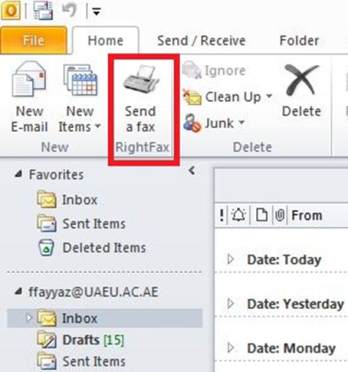
Send Fax from Microsoft Outlook:
Click the
Send a Fax
button in the Outlook toolbar.
Under
Fax Address
, type the recipient details as similar to do
using FaxUtil and press
Add Recipient
Button.
Attach the document as in the same way as you would normally
attach a document to an email
Use Fax Service from Internet Explorer:
In
Internet Explorer
, open the URL:
http://efax.uaeu.ac.ae/
webutil
.
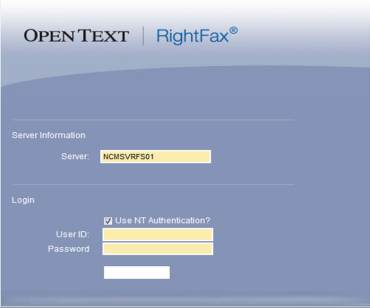
Login with the domain username/password.
You can add the
URL into your trusted websites so you will not be required to re
-type your credentials as you have already logged in on your PC
with your UAEU ac
count.
Tips for some features
Create a New Document to Send:
Click the
New Document
button. This opens the
Fax
Information
dialog box.
Add fax number or click the arrow next to Fax Num-
ber, select E-mail Address and type the recipient E-
mail address.
Specify your cover sheet notes and options, file and
library document attachments, and other sending
preferences.
Click
Send
to send the document.
Attach Files to Your Document:
In the
Fax Information
dialog box, click the
Attach-
ments
tab.
Click the
Browse
button to search for the files to
attach. Each selected file is displayed in the
Select-
ed Attachments
list.
Create an Individual Phonebook Entry:
Click the
Open Phonebook
button in the FaxUtil
toolbar.
Click
New Entry
. Enter a name for the phone-
book entry in the
ID
box and a fax number in the
Fax Number 1
box.
The Same process is used to create an e-mail ad-
dress Phonebook entry, just click the arrow next to
Fax Number 1
and select
E-mail
Address
on the
Forward an Existing Fax to New Number:
Select the
Fax
to forward.
Click the
Forward to New Number
button in the
toolbar, and then complete the address boxes in
the Fax Information dialog box.
Click
OK
to send.
By: Farrukh Fayyaz
Tutorial